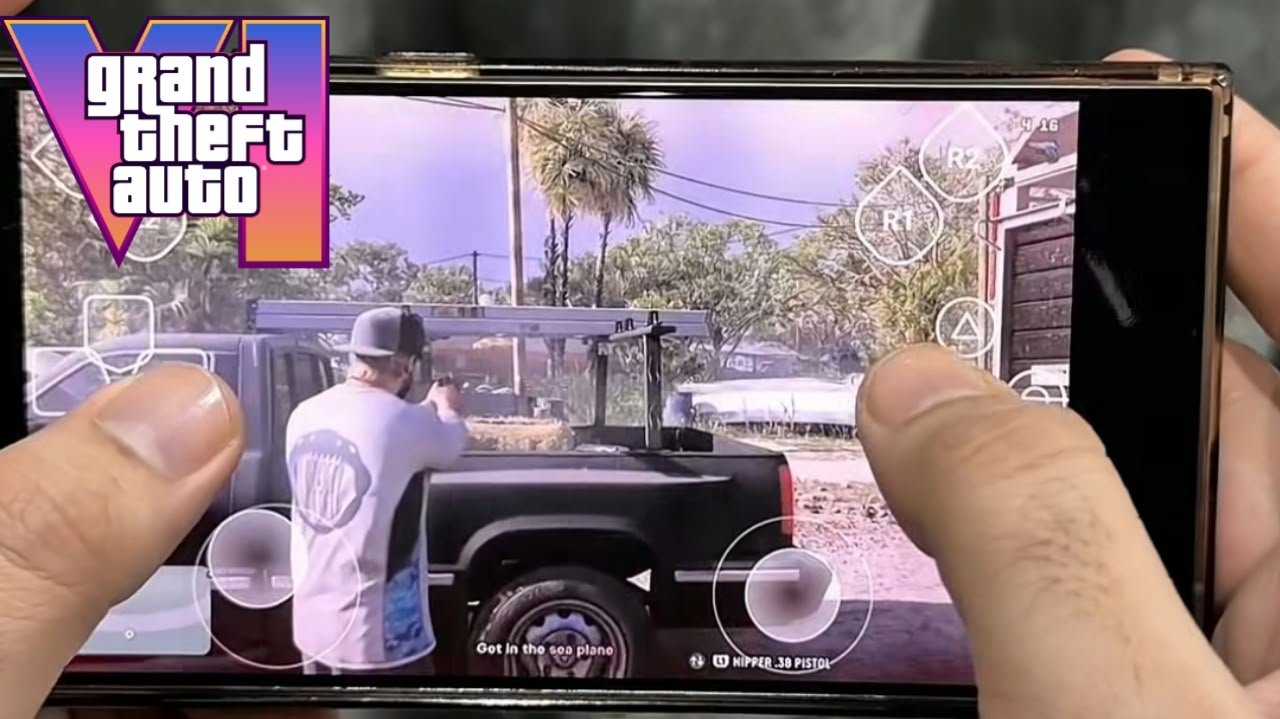
How to Play GTA 6 on Mobile: A Simple Guide for Android and iPhone
After years of waiting, two delays and a lot of trailers, Grand Theft Auto VI is finally out. It launched on November 19, 2026, and right away a lot of people started searching for “GTA 6 mobile download.”
It’s a fair question, because most of us carry a phone everywhere and not everyone has a TV free all evening. So here’s the honest answer first, then the method that actually works.
Is GTA 6 Available on Mobile?
No, not as a game you install on your phone. At launch, GTA 6 is only available on PlayStation 5 and Xbox Series X|S. There’s no official Android version, no iPhone version, and not even a PC version yet.
That doesn’t mean you can’t play it on your phone, though. Rockstar has confirmed that GTA 6 fully supports Remote Play on both PlayStation and Xbox. With Remote Play, the game runs on your console at home and streams to your phone, kind of like a video call where you control the action.
So if you (or someone in your house) own a PS5 or Xbox Series X|S with GTA 6, you can play it on your phone today.
How Remote Play Works
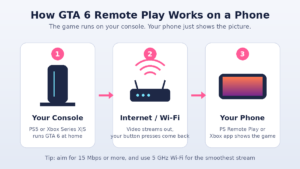
Your phone isn’t running GTA 6 itself. Here’s what’s going on behind the scenes:
- Your console runs the game at full quality.
- Your internet connection sends the video to your phone and sends your button presses back to the console.
- Your phone shows the game and acts as the screen and controller.
Because the console does all the heavy work, you don’t need an expensive gaming phone. What you really need is a good internet connection.
What You Need Before You Start
Make sure you have these ready:
- A PS5 or Xbox Series X|S with GTA 6 installed
- A phone or tablet (Android or iPhone) running a recent software version
- The official app: PS Remote Play for PlayStation, or the Xbox app for Xbox
- A good internet connection. Sony recommends at least 5 Mbps, and 15 Mbps or more for the best experience. For Xbox Remote Play, aim for at least 10 Mbps on 5 GHz Wi-Fi.
- A controller (strongly recommended). On-screen touch controls work, but a game like GTA 6 is much easier with a real controller. You can pair a DualSense or Xbox controller to your phone over Bluetooth, or use a phone grip controller.
How to Play GTA 6 on Mobile Using a PS5
Step 1: Turn on Remote Play on your PS5
Go to Settings > System > Remote Play and switch on Enable Remote Play.
Step 2: Keep your console ready in Rest Mode
Go to Settings > System > Power Saving > Features Available in Rest Mode. Turn on Stay Connected to the Internet and Enable Turning On PS5 from Network. This lets your phone wake up the console even when you’re not near it.
Step 3: Download the PS Remote Play app
Install PS Remote Play from the Google Play Store or the Apple App Store. It’s free.
Step 4: Sign in
Open the app and sign in with the same PlayStation account you use on your PS5.
Step 5: Connect a controller
Pair your DualSense controller to your phone through Bluetooth settings. If you skip this, the app will show touch buttons on the screen.
Step 6: Start playing
Choose PS5 in the app. It will find your console, connect, and show your PS5 home screen. Open GTA 6 and you’re in Leonida, on your phone.
How to Play GTA 6 on Mobile Using an Xbox Series X|S
Step 1: Enable remote features on your Xbox
Press the Xbox button, then go to Profile & system > Settings > Devices & connections > Remote features and turn on Enable remote features.
Step 2: Set the power mode
In the same area, make sure your console is set to Sleep (not full shutdown) so it can be woken remotely.
Step 3: Install the Xbox app
Download the Xbox app from the Play Store or App Store and sign in with the same Microsoft account as your console.
Step 4: Connect and play
In the app, tap the console/library icon, choose Remote play on this device, and wait for it to connect. Then launch GTA 6.
A quick note on Xbox Cloud Gaming: GTA 6 is available through Xbox Cloud Gaming, but only on Xbox consoles. It does not stream to phones through the cloud. On mobile, Remote Play from your own console is the way to go.
Tips for Smoother Gameplay on Your Phone
Remote Play can feel great or laggy depending on your setup. These small changes make a big difference:
- Connect your console with a LAN cable. This is the single best upgrade for a stable stream.
- Use 5 GHz Wi-Fi on your phone instead of 2.4 GHz.
- Sit closer to your router if you’re at home.
- Close background apps on your phone, especially downloads and video apps.
- Lower the stream quality in the app settings if you see stuttering. 720p on a phone screen still looks good.
- Watch your mobile data. Remote Play uses a lot of data, much more than normal video streaming, so be careful if you’re not on Wi-Fi.
- Keep your phone cool. Long sessions can heat it up. Take the case off, or use a phone cooler if you play for hours.
Watch Out for Fake “GTA 6 Mobile” Downloads
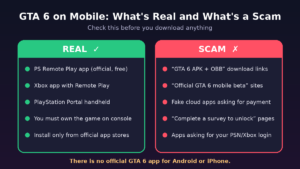
This part matters. Right now the internet is full of websites and videos claiming to offer a “GTA 6 APK,” “GTA 6 mobile beta,” or “GTA 6 OBB file.” None of them are real. Rockstar hasn’t released any mobile version of GTA 6.
These fake downloads are often used to:
- Install malware or spyware on your phone
- Steal your Google, PlayStation or Xbox account
- Trick you into fake surveys or paid subscriptions
- Show you endless ads with nothing at the end
Some are just mobile games from other developers renamed to look like GTA 6. Others are worse.
A simple rule: if it isn’t the official PS Remote Play app or the Xbox app, downloaded from the Play Store or App Store, don’t install it. And never type your PlayStation or Xbox password into any random website or app.
What If You Don’t Have a Console?
For now, there’s no official way to play GTA 6 on a phone without a PS5 or Xbox Series X|S running the game. If you don’t own a console, here are your realistic options:
- Play on a friend’s or family member’s console using Remote Play, with their permission and their account.
- Wait for future announcements. Rockstar hasn’t announced a PC version yet, but Rockstar games usually reach PC eventually. Cloud gaming options for more devices could follow.
- Consider a PlayStation Portal. It’s a handheld made only for Remote Play, but it still needs a PS5.
Be careful with paid “cloud console rental” services that you find through ads. Check their reviews and terms carefully before paying for anything.
Frequently Asked Questions
Can I download GTA 6 on Android?
No. There’s no official Android version. Any “GTA 6 APK” is fake.
Can I play GTA 6 on iPhone?
Not as a native app, but you can stream it from your PS5 or Xbox using Remote Play.
Is Remote Play free?
Yes. The PS Remote Play app and the Xbox app are free. You only need to own the game and the console.
Can I play GTA 6 on mobile data?
Yes, if your connection is fast and stable. It uses a lot of data, so Wi-Fi is better.
Do I need a controller?
No, but it’s highly recommended. Touch controls work, but driving and shooting in GTA 6 feel much better with a real controller.
Will GTA 6 come to mobile in the future?
Rockstar hasn’t announced anything. For now, treat any “GTA 6 mobile release” news from unofficial sites with caution.
Final Thoughts
GTA 6 isn’t a mobile game, and no app can turn your phone into a PS5. But with Remote Play and a decent internet connection, you can explore Leonida from your bed, a different room, or even another city. Set up your console once, grab a controller, and stay away from fake APKs. That’s the safest and only real way to play GTA 6 on your phone right now.
